Which W-2 boxes to cover
The box names below are the ones the IRS uses in its General Instructions for Forms W-2 and W-3 (IRS). Ask the recipient what they need before you start.
| W-2 box (IRS name) | Usually safe to cover? | Keep it visible when |
|---|---|---|
| Box a: Employee's social security number | Yes | The recipient explicitly asks for it |
| Box b: Employer identification number (EIN) | Rarely needed to hide; it identifies the employer, not you | Someone needs to verify your employer |
| Box c: Employer's name, address, and ZIP code | No | Needed to show who paid you |
| Box d: Control number | Usually; the IRS describes it as an optional box employers may use to identify individual forms | Rarely needed |
| Boxes e and f: Employee's name and address | Name: no. Address: sometimes | The W-2 also serves as proof of address |
| Box 1: Wages, tips, other compensation | No | This is normally the point of sending a W-2 |
| Boxes 2 to 6: federal income tax, social security and Medicare wages and tax withheld | Sometimes | The recipient checks total income or taxes |
| Box 12: Codes | Sometimes; codes can show benefits, for example code D for 401(k) elective deferrals | The recipient asks for a complete form |
| Box 13: Checkboxes (statutory employee, retirement plan, third-party sick pay) | Sometimes | The recipient asks for a complete form |
| Box 14a: Other | Often; the IRS lists examples such as state disability insurance taxes withheld, union dues and health insurance premiums deducted | The recipient asks for a complete form |
| Boxes 15 through 20: State and local income tax information | Sometimes | A state or local agency needs it |
Your SSN may appear on every copy
The IRS instructions describe employers furnishing Copies B, C, and 2 of Form W-2 to employees (IRS), so a W-2 PDF from a payroll portal can contain the same details several times, one copy per page or several copies on one page. Cover box a on each copy.
The same instructions let employers truncate your SSN on employee copies, for example as ***-**-1234, but note that "Truncation of SSNs on employee copies of Form W-2 is voluntary" (IRS). So your copy may show the full number.
What we found when we tested it
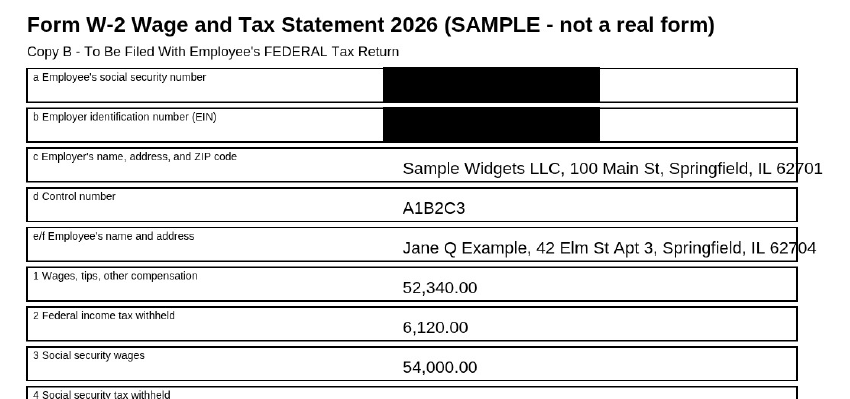
We made a 4-page sample W-2 with made-up details: Copy B, Copy C and two Copy 2 pages, each with the same SSN, EIN and all box values. We tested the live tool on October 22, 2026 (PT) in Google Chrome 155 on Linux, and again in Chrome's iPhone 13 device emulation with touch input (not a real iPhone).
| Check | Result |
|---|---|
| Free search for the SSN | "Found 4 match(es) on 4 page(s)": one per copy |
| Free search for the EIN | Also 4 matches on 4 pages |
| Boxes drawn | 8: box a and box b on each of the 4 pages (4 pages, so within the free 5-page limit) |
| Automatic check after export | All six checks passed: output re-opened with pdf.js, text layer removed, search test passed, metadata stripped, whole file scanned, no hidden content |
| Text left in the file | None on any page. Every page had a box, so every page is now an image |
| File size | 6,741 bytes in, 680,320 bytes out (693,215 bytes in iPhone emulation) |
How to redact a W-2 in 4 steps
- Download the W-2 as a PDF from your employer's payroll portal and work on a copy.
- Open it in InkOut PDF. Click Choose PDF above. The file stays in your browser and you don't need an account.
- Find every copy of your SSN. Use the free search with your SSN, or its last 4 digits, to highlight each match, then draw a box over each one. Do the same for any other box you're hiding. Redacting all matches in one click is a Pro feature. A scanned W-2 has no text to search, so draw boxes by hand.
- Export and check. Click Apply redaction(s), read the automatic check, then click Download redacted PDF. Search the downloaded file for your SSN's last 4 digits; nothing should be found.
Things to know
- Free: up to 5 pages per file, with boxes you draw. Unlimited pages, several files and redacting every search match at once are part of Pro.
- Black boxes only. The box is always black.
- Pages you redact become images. Text on those pages can't be selected or searched afterwards, and the file gets bigger. Pages without boxes keep their text.
- No OCR. Search only finds text that's really in the PDF. On a scan or a photo, draw the boxes by hand.
- Keep the original. Don't redact the copy you'll use to file your tax return; redact a separate copy for sharing.
- A redacted W-2 may not be accepted. Some lenders and agencies need the complete form. Ask first.
Related guides
- Redact a PDF in your browser
- Redact a pay stub PDF
- Redact a bank statement PDF
- Check a redacted PDF
- How to redact a PDF on Windows
FAQ
What should I black out on a W-2?
Usually box a, your Social Security number, on every copy in the file. Depending on the recipient, also the control number in box d, box 12 codes, box 14a and your address. Keep your name, the employer and box 1 wages visible if the W-2 is proof of income.
Should I black out the employer's EIN in box b?
Usually there's no need. The EIN identifies your employer, not you, and the recipient may use it to verify your employer. Cover it if the recipient doesn't need it.
Why does my SSN show up more than once?
A W-2 PDF often includes several copies, such as Copy B, Copy C and Copy 2, and each has box a. In our 4-copy test, the free search found the SSN 4 times, once per page.
Can I still file my taxes with a redacted W-2?
Keep an unredacted copy for your tax return. Redact a separate copy for anyone else who asks to see it.
Is it free?
W-2 files up to 5 pages with boxes you draw are free. Unlimited pages, keyword redaction and multiple files are part of Pro.
Sources (checked 2026-10-22)
- IRS, "General Instructions for Forms W-2 and W-3 (2026)" (box names, Copies B, C, and 2, SSN truncation, box 14a examples): https://www.irs.gov/instructions/iw2w3
- InkOut PDF live tool, tested 2026-10-22 with a synthetic 4-copy W-2: https://inkoutpdf.com/