The three kinds
| Desktop app (e.g. Acrobat Pro) | Online tool that uploads | In-browser tool (InkOut PDF) | |
|---|---|---|---|
| Where the file is processed | On your computer | On the provider's servers | In your browser, on your device |
| Install | Yes | No | No |
| Find text and redact every match | Acrobat Pro: yes (Adobe) | Depends on the tool | Search is free; redact all matches is Pro |
| OCR for scans | Acrobat: separate "Recognize text in scanned documents" feature (Adobe) | Depends on the tool | No |
| Cost | Acrobat: Pro, Premium or Studio plans only (Adobe) | Varies | Free up to 5 pages; Pro for more |
For two well-known online tools, see our sourced comparisons: InkOut PDF vs Smallpdf and InkOut PDF vs iLovePDF. For Acrobat, see InkOut PDF vs Adobe Acrobat and how to redact in Acrobat.
What to check in any redaction tool
- Is the text under the box removed, or only covered? Export, search for a word you removed and try to copy the area.
- Is the document metadata cleared? Title, author and keywords can name people or cases.
- Does it tell you if something went wrong? A check after export catches mistakes before you send the file.
- Where does the unredacted file go? For medical, legal or financial files, an upload may matter to you or your employer.
- Can it handle your files? Page limits, scans (OCR) and file types.
What we found when we tested InkOut PDF
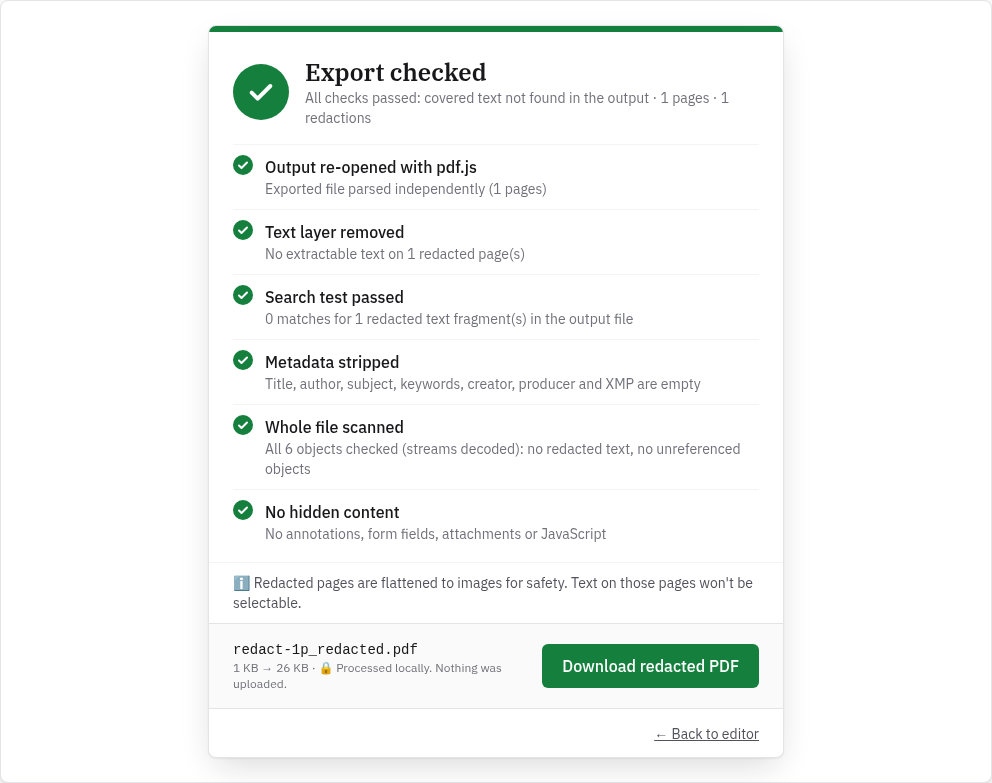
We tested the live tool on October 22, 2026 (PT) in headless Google Chrome 155 on Linux with a 1-page sample PDF we made (an account holder name, an account number and a balance, plus a title and author in the document properties). We drew one box over the account number and exported. We repeated the same steps in Chrome's iPhone 13 and Pixel 7 device emulation, drawing the box with touch input; that isn't a real phone, so treat it as a strong hint rather than proof.
| Check | Result |
|---|---|
| Automatic check after export | All six checks passed: output re-opened with pdf.js, text layer removed, search test passed, metadata stripped, whole file scanned, no hidden content |
| Text left on the redacted page | None. Text extraction returned an empty page, so the name and balance outside the box were removed from the text layer too (the page is now an image) |
| Document title and author | Empty in the exported file |
| Colour of the box in the export | Pure black (0, 0, 0) on desktop, iPhone and Android emulation |
| File | redact-1p_redacted.pdf, about 27 KB (26.7 KB on desktop); the original file wasn't changed |
When InkOut PDF isn't the right choice
- You need to redact long documents often: the free version stops at 5 pages per file (Pro removes the limit).
- You need OCR to find words on scans, or a choice of box colour. Acrobat Pro lets you change the redaction box colour (Adobe).
- You need redaction codes, audit trails or batch processing in a team workflow. That's what desktop or enterprise software is for.
Limits
- Free: up to 5 pages per file, with boxes you draw. A longer file shows: "This PDF has 10 pages. The free version handles up to 5 pages per file. Unlimited pages are part of Pro."
- Black boxes only. There's no colour setting; the box is always black.
- Pages you redact become images. Text on those pages can't be selected or searched afterwards. Pages without boxes keep their text.
- No OCR. Search only finds text that's really in the PDF. On scans, draw the boxes by hand.
- PDF only. Export Word or Google Docs files to PDF first.
- Pro features: redacting every search match at once, unlimited pages and several files. See pricing.
Related guides
- Redact a PDF in your browser
- How to redact in Adobe Acrobat
- InkOut PDF vs Adobe Acrobat
- InkOut PDF vs Smallpdf
- InkOut PDF vs iLovePDF
- Check a redacted PDF
FAQ
Is online PDF redaction safe?
It depends where the file is processed. Tools that upload send the unredacted file to a server; in-browser tools like InkOut PDF keep it on your device. Either way, check the exported file before you share it.
Do I need Adobe Acrobat to redact a PDF?
No. Adobe's Redact tool needs Acrobat Pro, Premium or Studio, but other tools, including InkOut PDF for files up to 5 pages, also remove text for real.
Does InkOut PDF have OCR?
No. Search only finds text that is in the PDF. On scanned pages, draw the boxes by hand.
Is there free PDF redaction software?
InkOut PDF is free for files up to 5 pages with boxes you draw, and its redaction checker is free with no page limit.
Sources (checked 2026-10-22)
- Adobe Experience League, "Redact sensitive information" (editions, find and redact, Set properties): https://experienceleague.adobe.com/en/docs/document-cloud-learn/acrobat-learning/advanced-tasks/redact
- Adobe Help, Acrobat desktop help (Recognize text in scanned documents topic): https://helpx.adobe.com/acrobat/desktop/protect-documents/redact-pdfs/redact.html
- InkOut PDF live tool, tested 2026-10-22: https://inkoutpdf.com/