What "remove" means here
| You want to | InkOut PDF |
|---|---|
| Delete a name, number or paragraph so nobody can recover it | Yes. Draw a box over it and export |
| Leave a blank white space where the text was | No. The box is always black |
| Replace the text with different words | No. InkOut doesn't edit text |
| Keep the rest of that page as selectable text | No. A page with a box becomes an image; other pages keep their text |
| Remove text from a scanned page | Yes, with a box drawn by hand (no OCR) |
How to remove text from a PDF
- Click Choose PDF above. The file stays in your browser.
- Drag on the page to draw a box over the text. Draw as many boxes as you need, on any page; to remove one, tap or click it, then tap ×.
- Click Apply redaction(s) and wait for the automatic check.
- Click Download redacted PDF. You get a new file; your original isn't changed.
What we found when we tested it
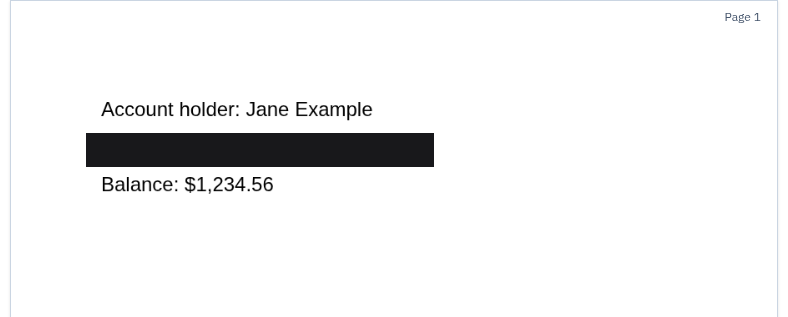
We tested the live tool on October 22, 2026 (PT) in headless Google Chrome 155 on Linux with a 1-page sample PDF we made (an account holder name, an account number and a balance, plus a title and author in the document properties). We drew one box over the account number and exported. We repeated the same steps in Chrome's iPhone 13 and Pixel 7 device emulation, drawing the box with touch input; that isn't a real phone, so treat it as a strong hint rather than proof.
| Check | Result |
|---|---|
| Automatic check after export | All six checks passed: output re-opened with pdf.js, text layer removed, search test passed, metadata stripped, whole file scanned, no hidden content |
| Text left on the redacted page | None. Text extraction returned an empty page, so the name and balance outside the box were removed from the text layer too (the page is now an image) |
| Document title and author | Empty in the exported file |
| Colour of the box in the export | Pure black (0, 0, 0) on desktop, iPhone and Android emulation |
| File | redact-1p_redacted.pdf, about 27 KB (26.7 KB on desktop); the original file wasn't changed |
We also looked for a way to make the box white: the editor has no colour control, and the export code draws every box in black. So the answer to "can the box be white?" is no.
If you need a white box or new text
- Edit the original document. If you have the Word or Google Docs file the PDF came from, delete the text there and export a new PDF. That's the only way to get a clean page with no box.
- Acrobat Pro lets you change how redaction boxes look, including their colour, under Set properties (Adobe Experience League). It's a paid desktop app.
- Don't cover text with a white shape in a PDF editor. A shape on top hides the words on screen, but they're still in the file and can be selected, copied or found with search.
Limits
- Free: up to 5 pages per file, with boxes you draw. A longer file shows: "This PDF has 10 pages. The free version handles up to 5 pages per file. Unlimited pages are part of Pro."
- Black boxes only. There's no colour setting; the box is always black.
- Pages you redact become images. Text on those pages can't be selected or searched afterwards. Pages without boxes keep their text.
- No OCR. Search only finds text that's really in the PDF. On scans, draw the boxes by hand.
- PDF only. Export Word or Google Docs files to PDF first.
- Pro features: redacting every search match at once, unlimited pages and several files. See pricing.
Related guides
- Redact a PDF in your browser
- Black out text in a PDF
- How to redact a document
- How to permanently redact a PDF
- Check a redacted PDF
FAQ
Can I remove text from a PDF without leaving a black box?
Not with InkOut PDF: every box is exported in black. To get a clean page, delete the text in the original document and export a new PDF, or use a tool that lets you change the redaction colour.
Can I replace the removed text with something else?
No. InkOut PDF removes content; it doesn't edit or add text.
Is the removed text really gone?
Yes. The redacted page is rebuilt as an image with the box burned in, and the automatic check searches the whole output file for the text you covered before you can download it.
Why can't I select the other text on that page any more?
Because the whole page is rebuilt as an image so nothing under a box survives. Pages without boxes keep their selectable text.
Sources (checked 2026-10-22)
- Adobe Experience League, "Redact sensitive information" (Set properties changes the redaction box appearance): https://experienceleague.adobe.com/en/docs/document-cloud-learn/acrobat-learning/advanced-tasks/redact
- InkOut PDF live tool and export code (box colour), tested 2026-10-22: https://inkoutpdf.com/