Free and Pro limits
| Free | Pro | |
|---|---|---|
| Pages per file | Up to 5 | Unlimited |
| Files at once | One | Several, one after another |
| Draw boxes by hand | Yes | Yes |
| Search for words | Yes | Yes |
| Redact every match of a word in one click | No | Yes |
| Automatic check of the export | Yes | Yes |
| Redaction checker | Yes, no page limit | Yes, no page limit |
Pro costs $4.99 for a 24-hour pass (one-time), $7.99 a month or $59.99 a year, as listed on the pricing page. A 24-hour pass works on up to 2 devices at once, and Pro Monthly or Yearly on up to 3.
If you open a PDF with more than 5 pages on the free version, InkOut tells you, for example: "This PDF has 6 pages. The free version handles up to 5 pages per file. Unlimited pages are part of Pro." If you choose several files, only the first one opens: "Multiple files at once is a Pro feature. Only the first file was opened."
File types
- PDF only. InkOut opens PDF files. To redact a photo or a scan saved as an image, turn it into a PDF first, for example with PDFWrangle's Image to PDF, a free tool from the same team.
- Text PDFs (made from Word, a bank's website, an accounting system and so on) work with both drawn boxes and word search.
- Scanned PDFs work with drawn boxes only. Searching finds nothing on a scan, and InkOut says so: "No matches found. Scanned pages without a text layer can't be searched; draw boxes manually." There's no OCR.
Password-protected and restricted PDFs
- PDFs that ask for a password to open don't open in InkOut. You'll see "Couldn't open this PDF. Is it password-protected?" Remove the password first with PDFWrangle's Unlock PDF, using the password you already know, then redact the unlocked copy.
- PDFs that open normally but block printing or copying (they have restrictions but no open password) open and export like any other PDF. The exported copy has no password and no print or copy restrictions. Your original file keeps its restrictions.
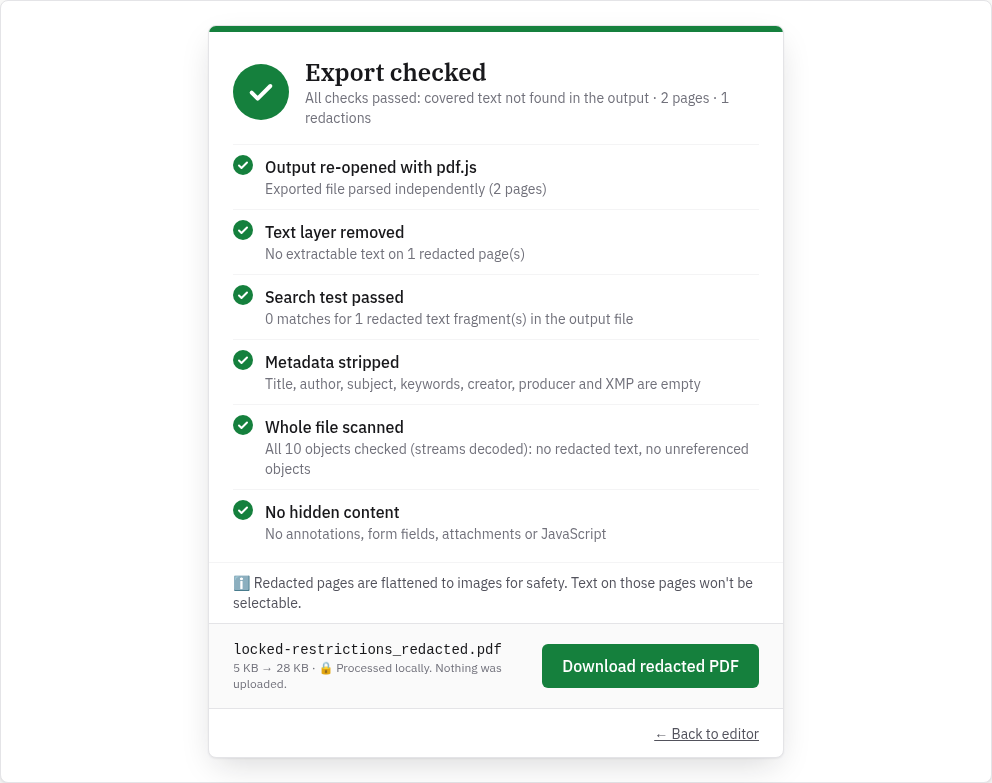
What changes in the exported file
| Part of the PDF | In the exported file |
|---|---|
| Pages you redacted | Rebuilt as an image at 144 pixels per inch with the boxes burned in. No text can be selected or searched on those pages, including text you didn't cover. |
| Pages you didn't redact | Copied as they were. Text stays selectable. |
| Links and comments | Removed from every page |
| Form fields | Removed. In our test the output had no form at all. |
| Bookmarks | Not carried over |
| Title, author, subject, keywords, creator, producer | Empty |
| Creation and modification dates | Set to January 1, 1970 |
| File name | Your file name with _redacted added, for example statement_redacted.pdf |
| File size | Can grow, because redacted pages are images. Our 3 KB sample became 28 KB. |
Your original file isn't changed. InkOut creates a new file and leaves the original where it was.
Other limits
- File size. InkOut doesn't set a file-size limit. Because everything happens in your browser, very large files depend on your device's memory.
- Internet connection. Stay online while you use InkOut. It doesn't work offline at the moment: in our test, opening or exporting a PDF failed after the connection was cut.
- Browser. Our tests used Google Chrome.
What we found when we tested it
We ran these tests on the live site on October 21, 2026 (Pacific Time) in headless Google Chrome on Linux, with sample files we made.
| Test file | Result |
|---|---|
| 2-page text PDF, one box on page 1 | Export checked, all six checks passed; 3 KB → 28 KB; page 1 became a 1224×1584 image; page 2 text unchanged |
| 6-page PDF | "This PDF has 6 pages. The free version handles up to 5 pages per file. Unlimited pages are part of Pro." |
| Two PDFs chosen at once | "Multiple files at once is a Pro feature. Only the first file was opened." |
| PDF with an open password | "Couldn't open this PDF. Is it password-protected?" |
| PDF with print and copy restrictions (re-tested after a fix on October 21, 2026) | Opened; Export checked, all six checks passed; the exported file has no restrictions |
| Scanned page (image only), searched for "SECRET" | "No matches found. Scanned pages without a text layer can't be searched; draw boxes manually." |
| Text PDF, searched for "SECRET" | "Found 1 match(es) on 1 page(s), highlighted in yellow." Redact all asked for Pro. |
FAQ
How many pages can I redact for free?
Up to 5 pages per file, one file at a time. Pro removes the page limit and lets you open several files.
Can InkOut redact a scanned PDF?
Yes, with boxes you draw by hand. Word search doesn't work on scans because there's no OCR.
Can I redact a password-protected PDF?
Not directly. Remove the password first with PDFWrangle's Unlock PDF, using the password you already know, then redact the unlocked copy.
Why can't I select text on the redacted page any more?
Every page you redact is rebuilt as an image, so all text on that page, not just the covered part, stops being selectable. Pages you didn't redact keep their text.
Does InkOut work offline?
No. Stay connected to the internet while you open, redact and export a file.
Is there a file-size limit?
InkOut doesn't set one. Large files depend on your device's memory, because the work happens in your browser.
Sources (checked 2026-10-21)
- InkOut PDF pricing (plans and prices): https://inkoutpdf.com/pricing
- InkOut PDF Terms of Service, sections 1, 3 and 5 (free and Pro features, redacted pages become images, no OCR, device limits): https://inkoutpdf.com/terms
- InkOut PDF Privacy Policy, section 1 (exported files have document metadata removed): https://inkoutpdf.com/privacy
- PDFWrangle Unlock PDF: https://pdfwrangle.com/remove-pdf-password
- PDFWrangle Image to PDF: https://pdfwrangle.com/image-to-pdf
- InkOut source, Redactor.tsx and pdf.ts (inkout-annual branch, matching the live site); live tests with sample files, October 21, 2026; offline test, October 20, 2026.